AudioVisual Tagger
AI-Powered Video Analysis & Metadata Generation
Overview
Here is AudioVisual(AV) Tagger. This is a local, easy-to-use web application that uses AI to automatically analyse video files and generate useful metadata in minutes. Users can upload videos and instantly produce object tags, spoken-audio summaries, full transcripts, and clear descriptions of what is happening visually on screen.
The tool is designed to save time for creators, editors, archivists, and organisations that work with large volumes of video. Instead of manually watching footage and writing descriptions, AV Tagger does the heavy lifting, helping users quickly understand, categorise, and search their content.
The application runs locally through a simple browser interface and supports both single files and batch processing. Results can be saved and exported, making it ideal for accessibility improvements, content management, compliance, and media documentation workflows.
Video Demonstration
Here's a video demonstration of the program's Audio Summarising capability using Abraham Lincoln's famous Gettysburg Address.
Please note that the video processing part has been sped up and that the time taken will vary based on analysis type selected and video length.
Example Output
Here's an example of the Object Detection feature using Disney's iconic video "Steamboat Willie":
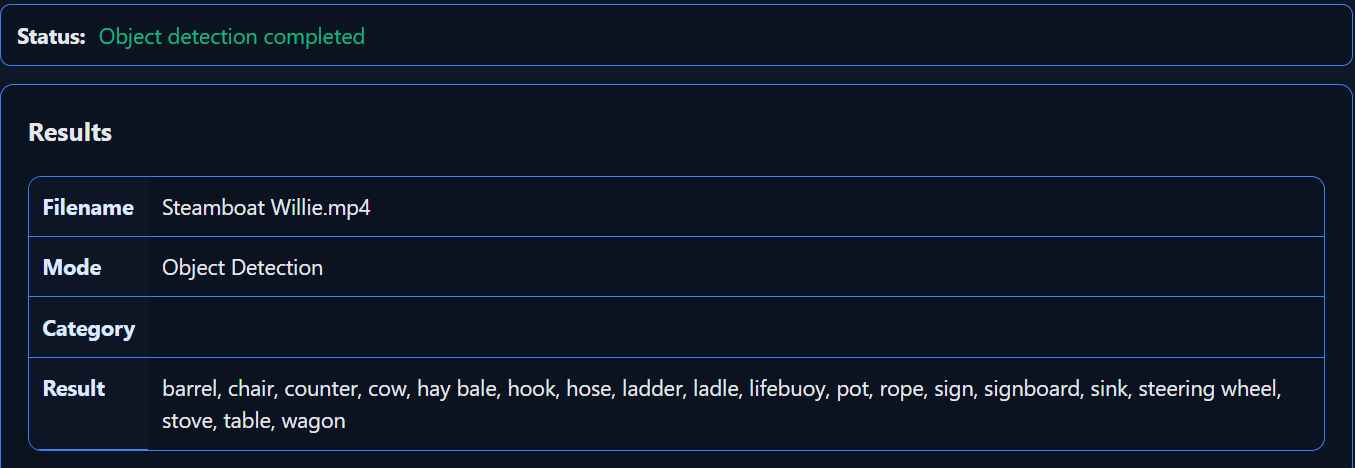
Object Detection analysis of "Steamboat Willie" (1928)
Info Regarding API Keys
Object Detection and Visual Summaries
Something important to note is that the program charges for its use of AI. This works through API keys, which allow the software to access the service that hosts the AI. The cost of using the AI is paid directly to the provider.
The AI provider used is OpenRouter, which charges depending on the model selected. However, even for high-quality models, the cost is typically less than a penny per use, so it is not a significant concern. I have pre-selected some good quality models for you to use.
To understand how to create OpenRouter API keys, follow this video:
Audio Summaries and Transcripts
In addition to OpenRouter, there is an additional AI called AssemblyAI which is used in the script for doing Audio Summaries and Transcripts. In this instance, there is no charge to use the API but you will need to create an account in AssemblyAI to create a second API key to use.
To understand how to create AssemblyAI keys, follow this video: